
Support center for flex.bi version 4.0
Changelog
- Gvido
- Miks Valers
- Inta (Deactivated)
6.3.5 / Released August 6, 2021
Features
- Added Account dimension in Stock cube
- Added State and Zip Code properties for Supplier dimension
- Added Customer closed and Customer no-mailing calculated members in Quotations cube
Bug-fixes
- Fixed a bug that caused an error when creating importing a property from custom fields in the Customer dimension
6.3.4 / Released July 30, 2021
Features
- Created a new measure In stock WA value in the Stock cube.
Bug-fixes
- Fixed a bug that prevented (none) member creation in the Item Group hierarchy of the Item dimension.
- Fixed a bug that caused wrong New customer count values after data reimport.
6.3.3 / Released July 22, 2021
Requirements after version change
- Job Costing cube has to be emptied and reimported.
Features
- Implemented a feature for counting new customers in HansaWorld cubes.
- Added new measures in the Sales Orders cube for open gross profit and not invoiced gross profit and quantity.
Bug-fixes
- Fixed a bug that caused wrong data after invalidating an already imported invoice.
- Fixed a bug that caused empty Invoice to Customer Code and Invoice to Customer Name properties.
6.3.2 / Released July 14, 2021
Features
- Added additional information on the Plans page.
- Implemented flex.bi colors schema as the default setting for new report creation
Bug fixes
- Fixed a bug that caused Financials cube import error when no profit account was defined.
- Fixed a bug that caused Invoices cube import error when importing custom country codes.
- Fixed a bug that caused wrong request url logging for incremental import.
6.3.1 / Released July 09, 2021
Features
- Introduced Planned delivery date support in Sales Orders and Purchase Orders cube.
- Created a new subscription payment method - Invoice.
- Extended the Custom fields functionality to all HansaWorld registers.
6.3.0 / Released May 21, 2021
Features
- Conditional cell formatting improvements – new exact value and regular expression conditions, top/bottom, and heatmap formatting, custom formulas.
- Change report height in dashboards – specify either fixed or dynamic report height.
- Add sparklines in table reports and gauge charts.
- Show Markdown, HTML, plain text, and date measures in gauge charts.
- Improved gauge width calculation to enable showing of more gauge items in one row.
- HTML and plain text formatting for calculated measures.
- Improved calculated member formatting selection drop-down.
- Remember the last used Analyze tab view (grid or list) and sorting criteria.
- Support for MySQL 8 database and JDBC driver.
- Improved row filter validation for regular expressions.
- Added endless scroll to large table reports in dashboards.
- Use size formatting suffixes (KB, MB, GB) in cell formatting conditions.
- Implemented Show Key functionality that allows changing between dimension item key and name display in report rows.
- Removed Zendesk chat option from the mobile devices, to enhance report readability.
- Created a new login screen.
- Implemented a solution for enabling incremental import for the supported registers by default.
Bug fixes
- Perform automatic vacuum on PostgreSQL tables after each import to reduce table size and improve query performance.
- Fixed the issue that caused different color schema being used by default, when creating new reports reports.
- Fixed the issue that prevented plan change from Trial to Business when Advanced Settings were defined.
- Fixed the issue that caused HansaWorld authorization error message being shown for other source applications.
- Fixed the issue causing geocoding error message being displayed when there is no Suppliers dimension in the data cube.
- Fixed the placeholder for the HansaWorld REST API import refresh period.
- Fixed the placeholder for the HansaWorld REST API default import start date.
- Fixed the issue that caused underscores being used in the cube custom fields section title.
6.1.3 / Released Apr 15, 2021
Features
- Implemented unique customer/supplier count measures in all relevant cubes.
Bug fixes
- Changed Quotation Count measure datatype to integer.
6.1.2 / Released Mar 22, 2021
Features
- Added an option to enable Custom Hierarchy creation for consolidated accounts
Bug fixes
- Fixed compatibility issues with PostgreSQL database server
- Fixed the issue that caused incomplete PDF exports
- Fixed the issue that caused Geocoding request failures
6.1.1 / Released Feb 26, 2021
Bug fixes
- Fixed FIFO Value import in Stock Depreciations cube
- Fixed the issue with error handling for Google Spreadsheet import
- Fixed the issue with import error handling that caused clutter in the log files
- Fixed the issue that caused a deadlock when importing consolidated data
- Fixed the issue that prevented dashboard embedding
6.1.0 / Released Feb 05, 2021
Features
- Define report specific calculated measures
- View calculated member usage in reports and other calculated member formulas
- Show a warning when navigating away from an unsaved modified report in the Analyze tab
- Markdown formatting for calculated measures
- Support for PostgreSQL versions 11 and 12
- Custom property hierarchies in Customer, Person, Item, Account, Supplier dimensions
- Now for Consolidated accounts there is an extra hierarchy that combines members with the same name from different companies
- Purchase Invoice measures are now shared in Invoices cube
- Hansaworld imports now retry import several times when receiving Unauthorised error
- In usage statistics more detailed information now is available for HansaWorld imports
Bug fixes
- Several fixes in additional data import column mapping validations and import
- Allow deletion of custom data cube dimensions
- Budget import in financials cube now works with consolidation
- Import only selected companies in Companies dimension for consolidated accounts
- Fixed a bug where consolidated accounts with companies that had characters in their code would fail to import objects
- Fixed a bug where custom fields would not import
- Fixed a bug where Good Receipts import would fail if they contained information in Best Before property
6.0.1 / Released Nov 27, 2020
Bug fixes
- Fixed a bug that caused a timeout when consolidating 90 companies
- Fixed a bug that caused client/supplier category name and item group name removal with incremental import
- Fixed a bug that caused a data validation error when using incremental import
- Fixed a bug that caused the Week day dimension breakdown on consolidated import
6.0.0 / Released Nov 6, 2020
Features
- Now all the companies are available for selection for consolidation in import options application setup step
- Added Budgets and Revised budgets for Financials cube
- Editing HansaWorld source application works faster now
- Added Week Day dimension
- New user interface with a lighter and brighter look. The new larger color palette for charts, lighter headers for table reports, new icons, and improved navigation.
- Additional standard calculations – cumulative sum including empty values, many "time ago" calculations, empty as 0.
- Freeze row headers (in addition to column headers) in table reports.
- Show All member names in gauge charts when other members used from the same dimension.
- Added hours, minutes, seconds formatter for usage statistics duration measures.
Bug fixes
- Fixed a incorrect "There is no active subscription for this account" message in HansaWorld application setup
- Fixed some incremental import interrupt issues
- Fixed a bug with breaking the cube structure when selecting and deselecting cubes for import and having source files linked to then
- Fixed a bug that showed incorrect error message in Source Data section when creating a Trial account
5.2.1 / Released Aug 28, 2020
Bug fixes
- Fixed the issue that caused Rest API authorization failure for any company other than the 1st.
- Fixed the issue that caused extra dimension selection drop-down menus not being updated after selecting different company.
5.2.0 / Released Aug 7, 2020
What's new
Bug fixes
- Fixed gross profit base amount not being imported correctly with multiple currencies
- Fixed error message after successful payment with credit card
- Fixed a bug where a new application with no selected cube would count as another cube selected
- Fixed a bug where it was only possible to add one less user then the actual account limit
- Fixed a bug where emptying or deleting one cube would cause all the other cubes to be re-imported from start as well
- Fixed a bug where "Authorize URL" and "Token URL" fields where not filled when switching from file
- Fixed an incorrect error message when embedded dashboard was not available anymore
5.1.2 / Released June 19, 2020
Bug fixes
- Fixed the issue that caused wrong error messages appearing in the Source Application section.
- Fixed the issue that caused error messages with missing translations.
- Fixed the issue that prevented users from resetting their passwords.
- Added the All Accounts section for administrators.
- Added a procedure for deleting old accounts.
- Removed unnecessary code for the dark theme.
5.1.1 / Released May 11, 2020
What's new?
- Added automatic tests for Purchase Invoices cube.
Bug fixes
- Fixed the compatibility issue with MySQL-java connector v8.0.
- Fixed the issue that caused duplicate import initialization after server restart.
- Fixed customer and supplier classification issue in Purchase Invoices un Purchase Orders cubes.
- Fixed the issue with a wrong account unlock link sent to the user.
5.1.0 / Released April 22, 2020
Whats new?
- Add standard calculations based on selected measures.
- All Accounts page in System Administration.
- Improved Measures and Dimension UI in the Analyze report builder:
- Predefined and User defined measures groups, stored and calculated measures shown in the same list.
- Do not allow to modify predefined measure formulas.
- Filter measures by name.
- Remove selected report dimensions quicker using the remove icon.
- Select dimension members using the table row header actions.
- Removed deprecated PhantomJS support for PDF export (just the headless Google Chrome is supported for PDF exports).
- Highlight individual chart series on a mouse hover.
- New MDX function DateMembersBetween.
- Show stacked bar or area charts using relative percentage instead or values.
- Show drilled into member names in bar and line charts.
- Add a vertical line in bar and line charts (similar to previous functionality in timeline charts).
- Search and filter members by name in additional hierarchies.
- Oracle JDBC driver is removed from the eazyBI distribution, download and add
ojdbc8.jarto thelibdirectory if needed. - Drill into a single measure by another dimension level (and leave other measures at the summary level).
- Gantt chart weekly, quarterly, and yearly views.
- Improved Freeze header functionality when doing horizontal scrolling of wide tables.
- Add custom multi-weekly hierarchies in the Time dimension.
- Show stacked bars or areas using relative percentage also in timeline charts.
- Do not allow empty or delete a cube while a data import is in progress.
Bug fixes
- Better detection of mobile devices.
- Fixed overlapping of label names in some charts.
- Export to Excel cell formatting for empty cells.
- Fixed DateAddDays and DateAddWorkdays to work correctly with daylight saving time changes and additional non-working days.
5.0.4 / Released February 21, 2020
Whats new?
- Improved geocoding address formatting and optimised precision change
- Added Purchase Invoices to available cubes for import
Bug fixes
- Fixed subscription for START plan for Tilde application
- Fixed a bug with incremental import and exporting/importing HansaWorld server
- Fixed a bug with invalidated invoice import still creating some records
- Removed dynamic fields import from Stock Movements cube
5.0.3 / Released January 24, 2020
Whats new?
- Currency support added for Tilde application
Bug fixes
- Fixed URI validation problem for Geocoding feature
- Fixed problem, when importing invoices with items that have code ending with a do
5.0.2 / Released December 27, 2019
Bug fixes
- Fixed empty purchase order import
- Restricted invalid invoices import
- Adjusted CSS for improved visual style
5.0.1 / Released December 09, 2019
Bug fixes
- Fixed import for REST API and Google spreadsheets applications
5.0.0 / Released December 09, 2019
Bug fixes
- Fixed calculated member disappearing when being created during import for rest api import
Whats new?
- Added Purchase Invoices to available cubes for import
- Improved import speed for HansaWorld application
- Extra dimensions selection now contains also names for the extra dimension codes
- Added Advanced settings to HansaWorld application import that can be used for dynamically importing new dimensions, measures and properties
- Added incremental import functionality for HansaWorld application. Needs to be enabled in order to use. Please see How To Use Incremental Import With Rest API 2.0.
- Sample reports now will be imported by default
4.5.1 / Released November 08, 2019
Bug fixes
- Fixed data import with reverse VAT for HansaWorld application
- Fixed updated lines not importing for Tildes Jumis application
4.5.0 / Released September 10, 2019
Whats new?
- Added option to archive POS data to save space and increase report execution speed
4.4.1 / Released August 06, 2019
Bug fixes
4.4.0 / Released July 12, 2019
Whats new?
- Added a new source application - Tildes Jumis
- Invoice items are now linked with financials accounts
- Removed "first_invoice_date" property
Bug fixes
- Fixed a bug where invoices balances would not work with postgreSQL
- Fixed Dashboard selection when accessing flex.bi from mobile
- Fixed project dimension missing (none) member
4.3.0 / Released March 29, 2019
Whats new?
- Share dashboards in a wallboard mode (optimized for showing on large monitors for public viewing).
- Specify Concurrency for paginated REST API import.
- Support MySQL SSL connection for the flex.bi database and for SQL data import.
Report results export API can be used with the embed_token authentication parameter.
Bug fixes
- Several fixes for MDX autocompletion in the calculated members editor.
Fixed positioning of drill through dialogs in embedded reports.
Show the correct first label for the range bar chart type.
Fixed dashboard subscription email sending for dashboards with data access roles.
- Headless Google Chrome version 71 can be used for PDF export.
- Support the latest Microsoft SQL Server JDBC driver.
- Fixed sending of email notifications about failed source application imports.
- Order dimensions in the same original sequence when dragging dimensions back to available dimensions in the Analyze tab.
Fixed access to cube reports for admins when using data access roles.
Fixed saving of the "No regular import" frequency.
4.2.2 / Released February 28, 2019
Whats new?
- Shared "Standard Problems" dimension to POS cube
4.2.1 / Released January 23, 2019
Whats new?
- Added "row count" measure to POS cube
- Shared multiple measures to POS cube
Bug fixes
- Fixed activity states register import
4.2.0 / Released January 4, 2019
Whats new?
- "Closed" and "Disable Mass Email" properties to Customer dimension
- Updated SQL and REST API application design
- Added "Unpaid invoice periods" dimension
- Added invoice row count measure to invoices cube
- Updated "Cube properties" section design in "HansaWorld import options"
- Added "Unit" dimension
- MDX autocompletion for the calculated member formula editor.
- Dimension now can be used both - in pages and in rows or columns
- Incremental import for REST API and SQL applications
- Show / hide available dimensions in the Analyze tab report designer
- Enforce usage of Measures in the Analyze tab report designer
- Rename row dimension headers in table reports
- Improvements for performance and error debugging
- Enable SSRF protection for REST API and SQL imports
- Improved mobile device detection
- Allow to change Google Sheets data source when the sheet ID has changed
Bug fixes
- Fixed source application creation with "Source Files only" option
- Support for PostgreSQL 10 as an flex.bi database
- Improved database connection pool handling during Jira import to use fewer database connections
- Improved logging of database connection test errors
- Fixed file import with register having multiple custom fields
- Fixed "Project (Job)" not working correctly in CRM cube
- Fixed flex.bi not offering to authorise again when there was no access to a register when setting up HansaWorld application
- Fixed extra dimensions selection being removed when there is no more access
4.1.6 / Released November 12, 2018
Bug fixes
- Added an option to disable extra dimensions to access HansaWorld application import option section without checking if flex.bi has access to the register in HansaWorld
4.1.5 / Released July 28, 2018
Whats new?
- Made changes to START subscription plan
Bug fixes
- Fixed an issue where extra dimension selections would disappear when there is no connection with HansaWorld Oauth
- Fixed an issue with importing transaction and simulations with PostgreSQL
- Fixed locations dimension not working with invoices record level
- Added configuration for default HansaWorld Oauth token expire time
4.1.4 / Released July 03, 2018
Whats new?
- Added additional properties to item dimension - "Base price" , "Weighted Average", "Weighted Average Base 2", "Cost Price", "Cost Price in Base 2"
Bug fixes
- Fixed incorrectly creating item groups when importing without Item Groups (ITVc) register
- Fixed incorrectly creating item groups for items with dots in their code
- Fixed VAT codes not working for Sales Order cube
- Fixed dashboards export to PDF with wrong colours for pie charts
- Fixed PDF export sometimes exporting empty reports
- Fixed some source files with specific formatting to be not uploaded
4.1.3 / Released June 13, 2018
Whats new?
- Improved look & feel when using HansaWorld as a source application
Bug fixes
- Fixed an issue with JIRA and Google Documents Applications
4.1.2 / Released April 27, 2018
Whats new?
- Added simulation import to Financials cube
- Adjusted subscription form
- Now interface when selecting source application
- Shared measures from POS to Invoices cube and from Invoices to POS cube
Bug fixes
- Fixed an issue with Refresh period not working correctly with HansaWorld Rest API 2.0
- Fixed an issue with HansaWorld Rest API 2.0 not importing Activity Types (ActTypeVc) register
- Fixed import stopping when some register records missing code
- Fixed last import time not displaying correctly for registers for rest api
4.1.1 / Released March 21, 2018
Whats new?
- Moved the least used dimensions to a separate dimension group called "Additional dimensions"
- Changed sign up form - now you agree to our terms and conditions when sign up
- Added an option to disable Zendesk for flex.bi Enterprise
- Added Holiday and Transferred working day imports to all relevant data cubes
- Disabled the ability to change the cube prefix
- Added register import progress to HansaWorld application status
Bug fixes
- Fixed issue where VATCodeBlock from Rest AP wasn't detected for VAT/GST check when importing
- Fixed an issue where deleting a HansaWorld applcation would cause "Table is already taken" error
- Fixed issue where it wasn't possible to change user role when user limit was reached
- Fixed issue where it wasn't possible to drill into Financials and Job Costing cube measures
- Fixed an issue where Rest API with Oauth2 import would not handle thousand separators correctly
4.1.0 / Released February 1, 2018
Whats new?
- Define data access roles and restrict access to folders, dashboards, and cubes.
- Export to PDF using the headless Google Chrome browser.
- Added methods to prevent accidental deletion (instead of empty) of a cube.
- Added "delete imported data" option to warning message when deleting a REST API or SQL data source.
- Improved mobile and tablet UI.
- Embedded dashboards can now enable public access with tokens
- Added multi-threaded import for most registers.
- Added support for HansaWorld Rest API v2.
- Added consolidation hierarchy for objects and accounts.
- Removed currency import from the Delivery cube.
- Added sample reports for POS and Deliveries cubes.
- Added warning messages to automatically generated calculated members to prevent them from being edited.
- Added registration number property to Customer and Supplier dimensions.
Bug fixes
- Adjusted customer geocoding to only geocode new or updated customers.
4.0.12 / Released December 5, 2017
Whats new?
Added a templates button to the navigation, that links to the templates accounts dashboard specified in the new server parameter:
templates_account = "https://flex.bi/bi/accounts/47/dashboards"
- Replaced each cubes sample reports with only 2 reports, that convey the cubes purpose more thoroughly.
- Added support for importing days off with the BHollVc register as well as support for the moved work day register EPWorkDayChVc.
- Added the flex.bi enterprise version to the footer.
- All customers are now imported regardless of their type.
- Added a "Task type" dimension in the CRM cube.
- Added "Activity state" dimension in the CRM cube.
- Added more validity checks and warnings when setting up consolidation.
- Added an option to import transaction row comments for the Financials cube.
Added an account parameter to ignore the historic changes of a persons sales group and only show the newest sales group for each person:
import_historic_salesman_groups = true/false
Will import historic data by default
Dark theme for embedded dashboards
Requires account level parameter
dashboard_theme = "dark"
Bug fixes
- Adjusted text in error e-mails.
4.0.11 / Released August 29, 2017
Whats new?
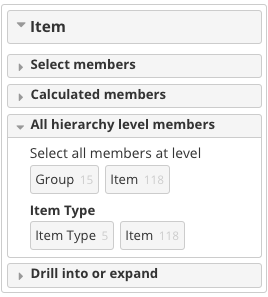
- Added another hierarchy to the Item dimension
- Removed fields, that weren't being used
- Removed "Reserved" from the Stock Cube
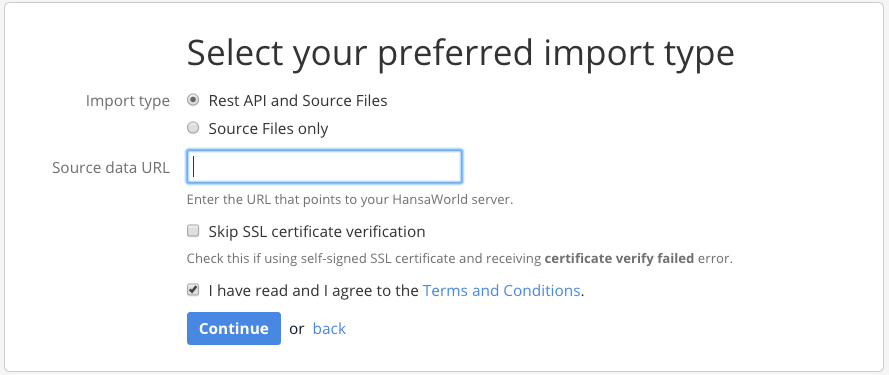
- First page of the HansaWorld application has been restyled
- Added a new cube - Deliveries
- Imports will be stopped if records have VAT, but no VAT codes have been uploaded
- It is now possible to import down payment invoices
- Added VAT/GST to the POS cube
- Unlimited Google Sheets applications are now available for the Business plan
- Added another hierarchy to the Item dimension
Bug fixes
- Company status now imports correctly
- Added geocoding for the Suppliers dimension
- Stock movements now show the "Objects" property correctly
- Fixed the way person groups are displayed if they are ever changed
- Fixed an issue when deleting cubes
- Fixed Extra dimensions import for quotations
- Fixed the missing (none) class for Projects
- Fixed the Job costing cubes item level measures not working
- Fixed missing register messages for registers with versioning
4.0.10 / Released July 27, 2017
Whats new?
- Added a parameter to the Objects extra dimension - "Closed"
- Removed Serial Number for Stock Movements record level
4.0.9 / Released July 10, 2017
Whats new?
- Enterprise customers should now be able to run their enterprise versions without having to edit eazybi.toml as much
- Added the ability to import OK'd and Not OK'd POS invoices
Bug fixes
- Fixed an issue where Invoice To Customer Code and Invoice To Customer Name were not inserted in the database
- Fixed an issue where Update date property was not working for the Customer dimension with Rest API
- Fixed an issue with the Start import from date and refresh period
- Fixed an issue where Activity types didn't have a (none) group
- Fixed an issue where special characters were not displayed properly in record names with Rest API
- Fixed an issue where the links weren't working on the login page
- Fixed a description on the HansaWorld import setup form
- Fixed an issue with broken map images
- Fixed an issue where Future days and Refresh period and days would default to the wrong values
- Fixed an issue with PayPal and FirstData payments
4.0.8 / Released June 20, 2017
Bug fixes
- Fixed "This month" and "Previous month" calculated members within the Time dimension
- Fixed a bug where refreshing a report during a Rest API import would return an error
- Stock depreciation cube Accounts will now be taken from the row level if possible
- Fixed an issue where imported Quotations didn't have a (none) class
- Fixed a bug with Rest API refresh day values being converted to the wrong data type
4.0.7 / Released June 6, 2017
Whats new?
- Country dimension is now available in the Invoice cube without the need for geocoding
Bug fixes
- Fixed an issue where TRIAL plan accounts couldn't select a regular import frequency
4.0.6 / Released June 2, 2017
Whats new?
- Added an option to edit how many days in the future REST API will take data from (default = 0)
- Added an option to edit how many days in the past REST API will refresh data from (default = 90)
- Added more measures, properties and dimensions to the Invoice cube:
- User information has been added to the Item dimension
- Supplier dimension has been added
- Stock in, Stock out and Goods Receipt item quantity, total cost and total base cost have been added as shared measures
- Calculated members that can return User information from the Item dimension have been added
- Added a debug_import parameter option for imports (available to Flex.bi Enterprise administrators)
- Added the e-mail as a property to the Person dimension
- Added a "Skip SSL verification" checkbox when trying to create a REST API connection
Bug fixes
- Trying to embed reports/dashboard when the plan does not permit it will return an error message stating so
- Fixed an issue where a JIRA cube was being counted twice towards maximum cubes in an account
- Fixed an issue where items with full stops in the names were not being imported correctly
4.0.5 / Released April 26, 2017
Whats new?
- It is now possible to cancel Invoice, Transaction and CRM imports during row import.
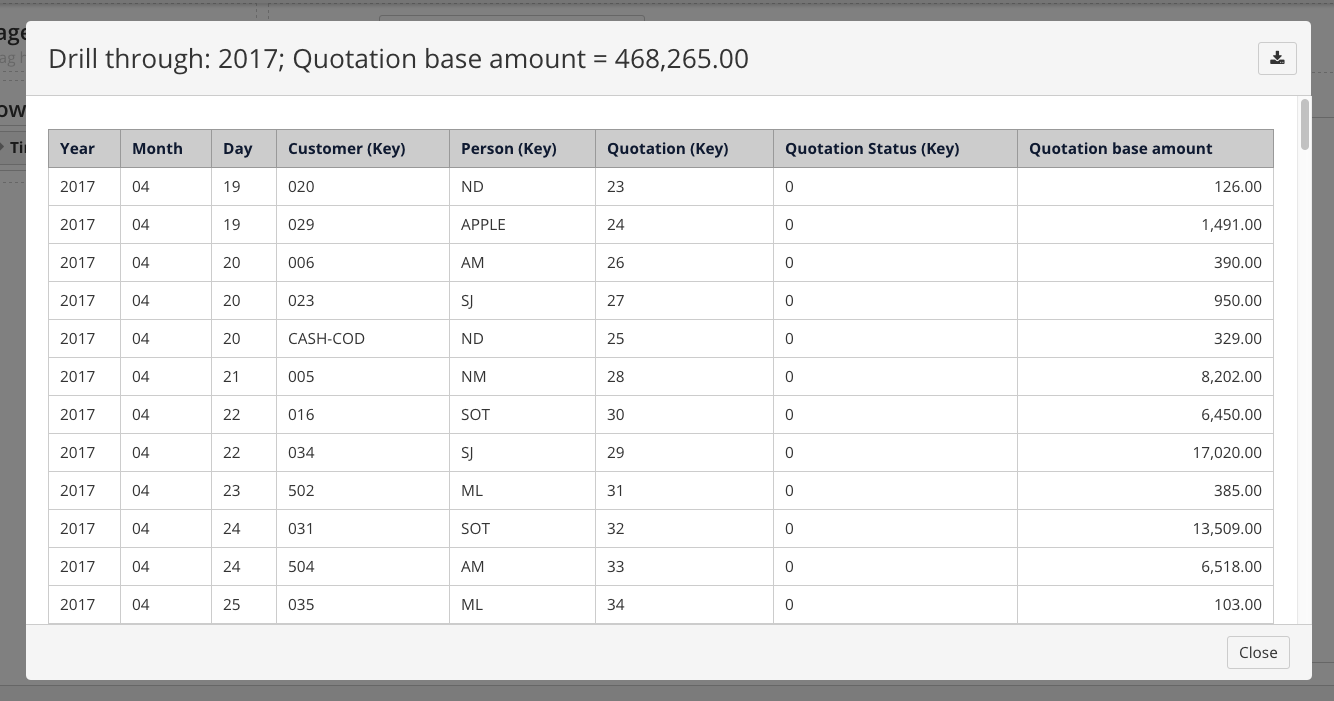
- Adjusted Quotation cube drill through columns
- Dynamic dimensions have been renamed to Extra dimensions in the application and documentation
- Moved Extra dimension import options to the top of the import option list
- Added non-alphanumeric character handling for Item and Location classes
Bug fixes
- Fixed browser tab titles not showing the correct text during login
- Zendesk chat will no longer show up in embedded reports and dashboards
- Fixed used data showing up with more than 2 decimal points
4.0.4 / Released April 21, 2017
What's new?
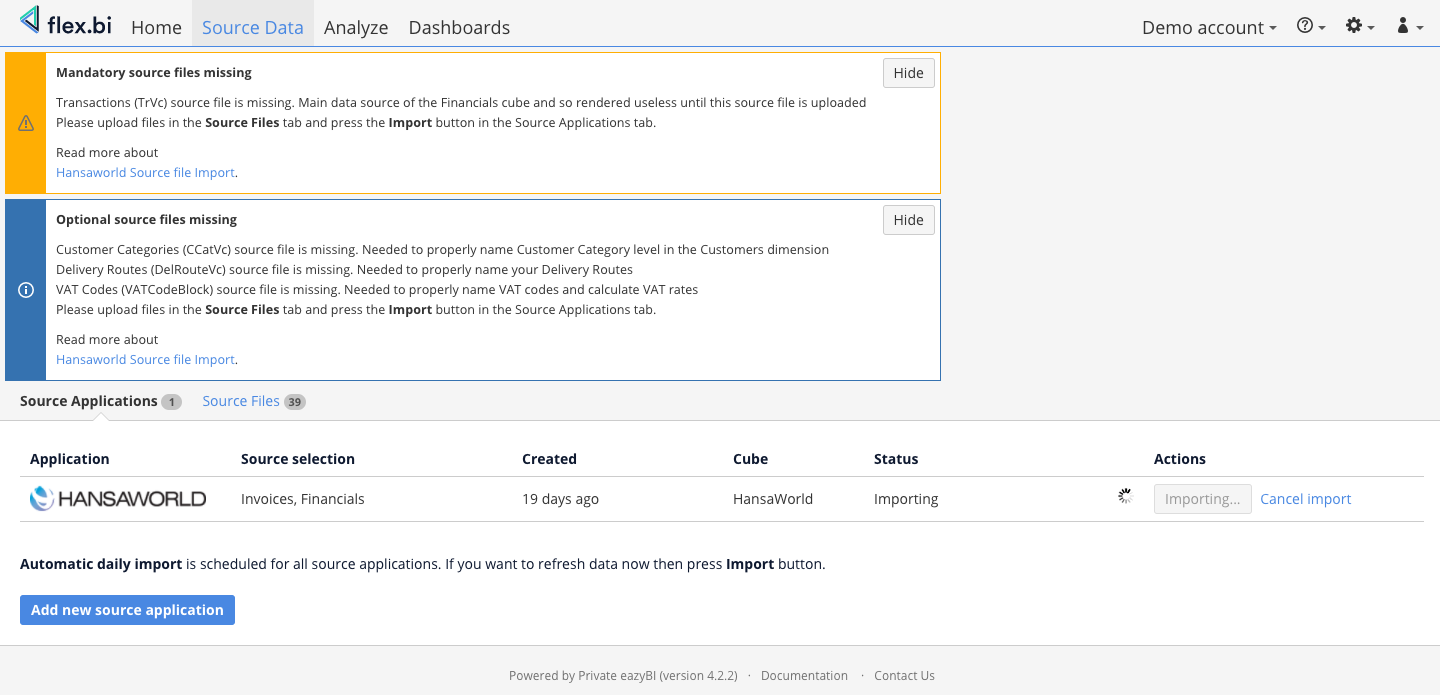
- Changed mandatory missing source files warning message from an error message to a warning message
- Changed optional missing source files warning message from a warning message to an info message
- Made missing source file messages collapsible
- Changed the save button color in the HansaWorld application setup for from grey to blue
REST API request limit can now be changed in eazybi.toml by adding the following parameter in the [general] section -
rest_api_request_size_limit = 12000- Added a validation for REST AP request limit size when loading the HansaWorld form
It is now possible to use the Weighted Average as the value of Total Cost price by specifying the following parameter in your account parameters -
use_wa_cost_price =true
Bug fixes
- Fixed an issue where the accounts dimension would have a (none) level if the Goods Receipts cube was imported
- Fixed grammatical errors
- Fixed the placement of the manual date format field
- Fixed the validation for the start date field
- Fixed the flickering of error messages and HansaWorld setup form elements
4.0.3 / Released April 13, 2017
Whats new?
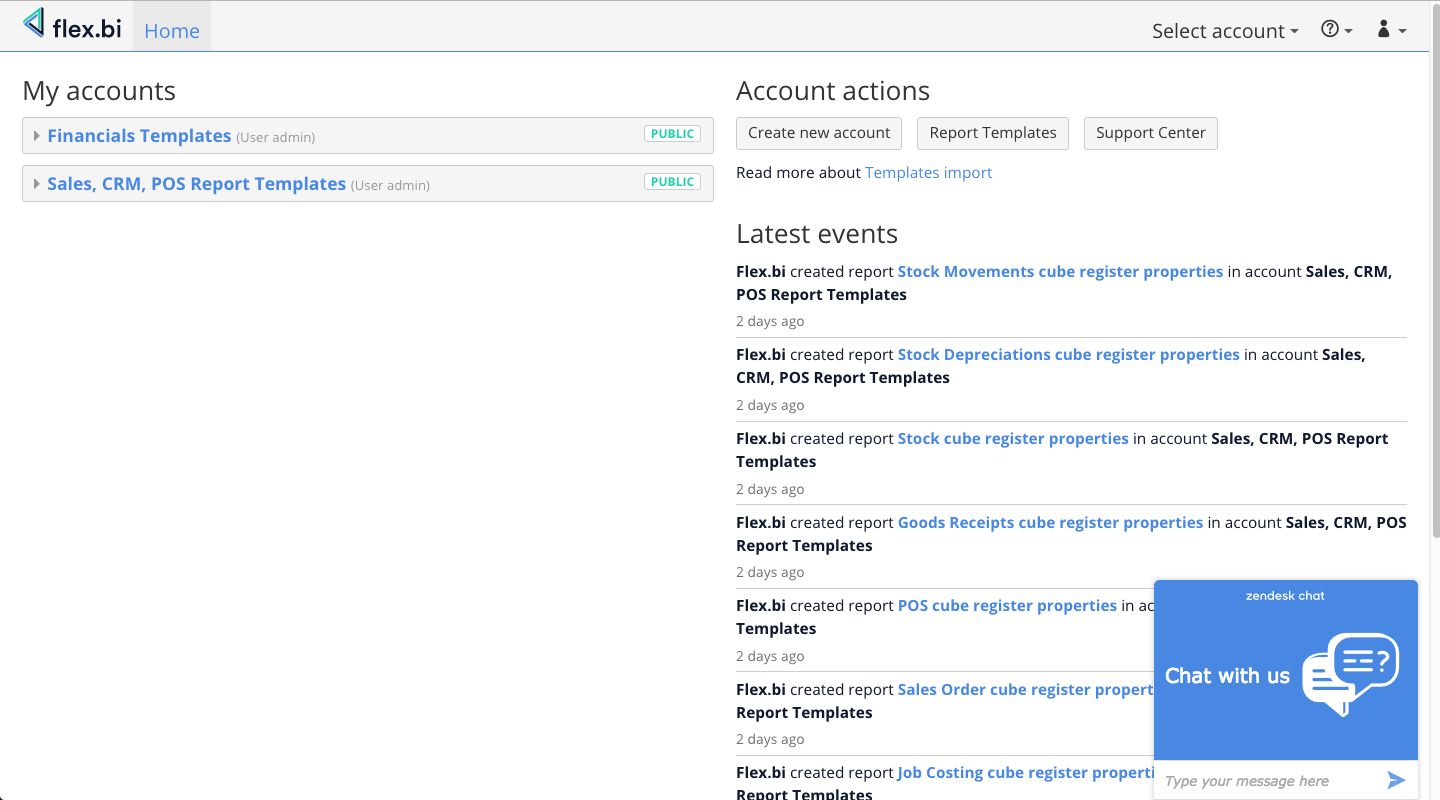
- Added a new overall design for Flex.bi to match that of the homepage
- Added shared measures from the Financials cube to the Invoice and CRM cubes
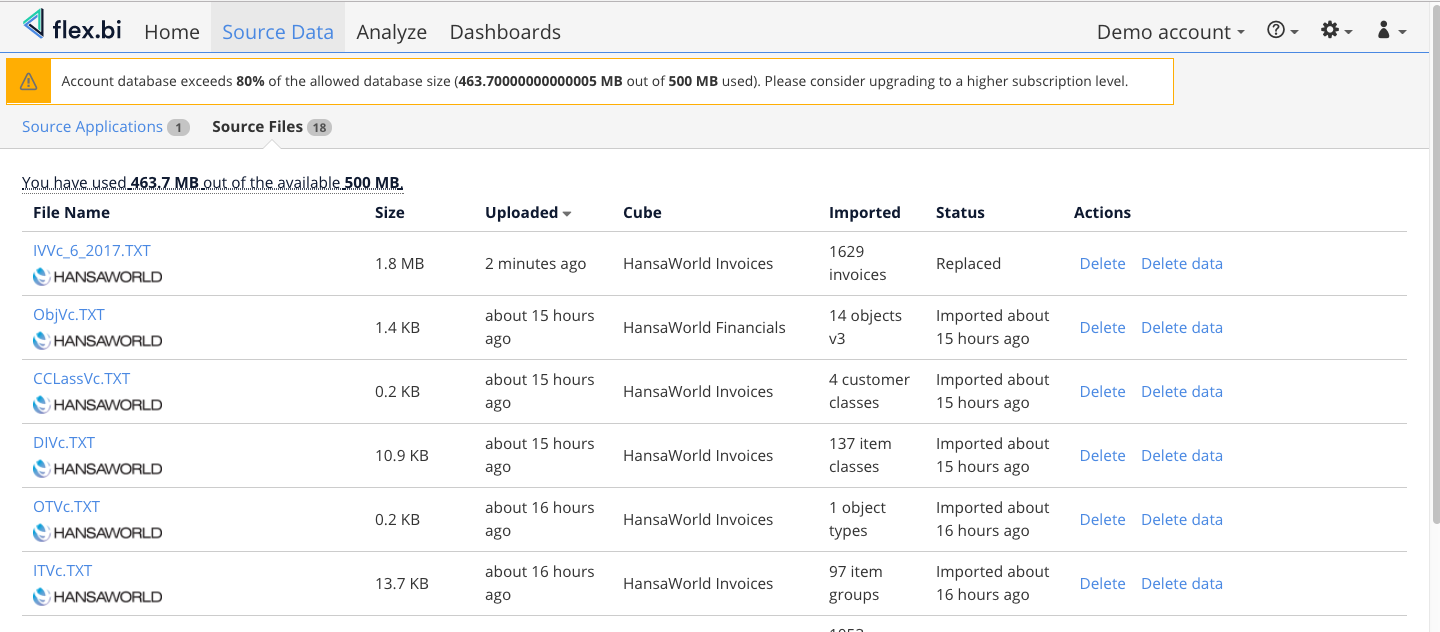
- Added an informative display in the Source Files tab that shows the user their total source file size and database size
- Added a warning when a user has exceeded 80% of their allocated source file and database size
- Added an error that stops an import when the REST API request exceeds a certain size
- Added a new overall design for Flex.bi to match that of the homepage
Bug fixes
- Fixed issue where a (none) level would be created for the Accounts dimension when Goods Receipts were imported.
- Fixed an issue where a user couldn't create an account
- Fixed an issue where SysFormatBlock registers with spaces for values weren't being parsed properly
- Fixed an issue where switching to the Start plan would produce an error
- Fixed an issue where having a non-HansaWorld source application would break embedding
- Removed account creation debugging
4.0.2 / Released April 6, 2017
What's new?
- Added USD as a currency option for plans
- Updated Flex.bi subscription plans
- Changed Start plan to a free subscription
Bug fixes
- Added debugging to figure out where account creation issues arise
- Fixed an issue that arose when trying to update database parameters in database.toml
4.0.1 / Released April 3, 2017
Bug fixes
- Fixed a bug that caused all Extra dimensions to be deselected when the HansaWorld setup form was saved after an import
- Fixed issues when usage statistics were enabled
4.0 / Released April 2, 2017
User friendly application setup.
Combined import
REST API import can be combined together with file import
Easier subscription to flex.bi plans
Changes to flex.bi plans
total amount of cubes is controlled instead of specific cubes
regular import frequency available depends on the selected flex.bi plan
Less parameters required to set up account
REST API import available without special parameters
- choose flex.bi plan without arbitrary parameters required
- import thread count depends on selected flex.bi plan
Paypal payment
- recurring automatic payments for subscriptions can be made straight through application with paypal
Faster import
- Multiple improvements in all cubes greatly speeds up imports in general and especially for large source files
Import predictive data with future dates with REST API
requires account level parameter
future_days = 30
Log transactions when importing with REST API
requires account level parameter
debug_import = ["TRVc"]
More fields from contact cards as properties
User String 1, User String 2, User String 3, User String 4, User String 5
User Value 1, User Value 2, User Value 3
User Date 1, User Date 2, User Date 3
Embedded dashboards refresh automatically, if parameters passed:
enable_sending_gauge_stats- set the url to where the data needs to be sentdashboard_refresh_time- the frequency of a dashboard refresh (default 1 min)dashboard_check_if_spinners_time- frequency of spinner checks (default 1/10 seconds)dashboard_check_if_no_spinners_time- frequency of a check for no spinners (default 1 second)
3.2
New dimensions
Routes dimension in Invoices, Quotations, Sales Orders, Stock Movements cubes
Invoice type dimension in Invoices cube
Country dimension in Invoices cube
New HansaWorld cube
POS cube, that can be used to analyze POS Invoices data
New Measure in Invoices cube
Total Weight measure
New Shared Measures in Stock cube
shared Financials measures - Account Balance, Account Debit amount, Account Credit amount
- shared Invoice measures Item Quantity, Item base amount, Gross profit base amount, Stock Quantity
- shared POS measures for the same things as from Invoices
Online chat with support
Geocoding
Requires account level parameter
geocoding_enabled = trueNew properties longitude and latitude based on customer addresses
- Data can be analyzed using OpenView maps
Dark theme for embedded dashboards
Requires account level parameter
dashboard_theme = "dark"
Design improvements
New color scheme for Reports and Charts.
Dashboard visual design improvements.
Dashboard monthly email subscriptions.
Additional chart axes and font size options.
Flex.bi usage statistics analysis.
- can be enabled in the eazybi.toml configuration file
- can be used to analyze flex.bi usage
Additional next page URL pagination option for REST API import.
Sort source files by any column in the Source Data tab.
Added show_all_public_accounts setting in eazybi.toml.
Enable drill through by in custom schema definitions.
Support for Microsoft SQL Server with Microsoft JDBC driver (if an SSL database connection is required).
Bug fixes
- Dashboards automatically refresh after data import
- Fixed "Invoice count" measure
Improved precision for amount import
Fixed several SSL connection and certificate validation problems.
- Improved positioning of popups in embedded eazyBI reports.
- Fixed proportional size of bubbles in a scatter chart.
- Try to refresh the REST API OAuth access token if expired.
- Do not allow PDF export using PhantomJS when in the development mode.
- Fixed export to PDF of gauge charts, table reports and Gantt charts.
- Fixed drill through cell when using aggregated calculated members.
- Fixed color picker rendering bugs.
- Reconnect to PostgreSQL if a read-only connection is detected.
- Fixed testing of database connection in the settings page and displaying of connection error messages.
3.1 / Released September 26, 2016
Improved REST API import:
- Added support for all the rest of the cubes to REST API import. Now all of the standard cubes are available for REST API import
- Added a feature in REST API where setting "Start Import From" to a certain date will re-import all the data from the specified date no matter what
- Added a new
refresh_period_in_daysparameter for REST API. Now it's possible to set a number of days in the past that REST API will import from the current day - REST API now supports automatic import
- Added support for company consolidation. The companies drop down menu now allows you to import data for multiple companies in the same flex.bi account. The object, item class, customer class and location type fields will show data from all available companies
Added Item Varieties support
If you are using item varieties in Standard ERP to purchase and/or sell your items you will be happy to hear that with this version we implemented full support for it in flex.bi. You can now choose which item variety groups you wish to analyse by.
New features
- Added classification types support. Please note that, since this feature is going to change names of your objects in flex.bi, using it you might encounter some conflicts in your current reports.
- Added Flex.bi and PostgresSQL compatibility
- Added two new measures in Invoice cube: "Stock Item quantity" and "Stock Item FIFO". These measures are shared on the Stock cube. In order to make these changes you will have to empty these cubes and import the data again
Bug fixes:
- Added special characters for type/class names during import (!@£$%^^^&*)(=-)
- Fixed bug that caused Calculated members disappear In dynamic Dimensions
- Fixed a bug with incorrectly handling of row level objects
- Fixed a problem with Invalid byte sequence in UTF-8
- REST API - set default day to import data from to the current day
3.0
REST API support is here
With the addition of REST API several features have become simpler, for instance you will now be able to directly connect to your HansaWorld server and import data into flex.bi completely eliminating the need to manually export registers, just hand flex.bi a URL to your HansaWorld server and it will do the rest. Before you even confirm your first import you will be able to set and freely configure the automatic imports schedule and change it when ever you wish. REST API currently supports importing data for Invoices, Quotations, Sales Orders and Financials cubes. It is now available for the users with the flex.bi "Standard" or "Business" packages and a HansaWorld Standard ERP version 8.1 2015-06-02 or higher.
An updated Stock cube
To help you keep a better track of what is coming and going through your warehouses, the flex.bi team has implemented support for item history. You will now be able to see how much of your items have come and gone, where they have come from, where they have gone to and have they been sold, bought, written off as damaged, lost, are they in transit or are they being used on the production line to create something new and unique.
Goods Receipts cube
It has never been easier to keep track of what has arrived in your warehouses until now. The freshly created Goods Receipts cube will help you analyze what kind of items have arrived at your doorstep and which supplier delivered them, what amount and at what cost.
Stock Depreciation cube
Now you are able to have a clean overview of your depreciation of stock, of the items you have withdrawn for internal use and the stock you have written off all in one cube - the Stock Depreciation cube. Analyze the data by the reasons of why your item has found its way into stock depreciation and examine the lost quantities and monetary value of those items.
Stock Movements cube
Ever been curious where your stock travels to? Well now you can find out with our new Stock Movements cube. This cube allows you to view and analyze where your items have traveled from, where they have traveled to and what stops they had along the way, let's not forget that you can also see the quantities and costs of the items that are traveling from location to location.
New sample reports
We have added a few new sample reports from our templates database to the standard sample reports that can give you an example on which you can build your own reports or modify the sample ones to your needs. The new additions include CRM reports that allow you to view customer value, a comparison with previous periods and how much time each sales person spends on a customer. Two Financial reports that allow you to analyze data by account type and analyze profit loss in a period. And a whole bevy of Invoice reports that show sales KPIs in a period, item turnovers, the top salesman on your team, general item statistics, the most profitable items and a report for salesman targets.
Updates
- Customer category names will now appear by their name
- Support for registers that contain a sequence number has been added
General bug fixes
- Fixed a bug where activity types were importing incorrectly
- Fixed a bug where projects where importing incorrectly
2.0
The possibility to use parallel imports
To ensure that your data is kept up to date as fast and as often as possible, our team has implemented multi-thread support for your data import needs. With the option to add additional parallel threads to increase importing speed by up to 50%, you can now import all of your files even faster. Not only is it available in the data cubes we have been providing you since version 1.0, but also in the newly created Job costing and CRM cubes that allow you to handle data about your projects and activities.
Newly implemented CRM cube
The CRM cube allows you to handle data that is connected with projects, activities, people and companies that you deal with on a daily basis. It allows you to analyse activities per customers, sales staff etc. which in turn makes it possible to display the sales efforts and the results of your workforce. By analysing your customers you can pinpoint which of them are the most important so you can focus on them and their needs.
By popular demand we have implemented a feature that allows you to import OK’d and un-OK’d activities and implemented measures that allow them to be sorted by their counts and durations. The customer dimension has also received a slight update with two new measures that allow customers to be sorted by their creation and update dates.
Freshly designed Job costing cube
The job costing cube presents you with the option to display and analyse project budgets and expenses by using most of the data located in other HansaWorld data cubes to present an easily viewable and understandable graph or table for you and your workforce.
Template database
Our team has also created a Template database that you can use as inspiration when creating your own reports. The database contains:
Updates
Of course we haven’t forgotten about our previous work and the improvements that can always be made, so we have added a few updates and bugfixes to our previous HansaWorld data cubes
The Sales cube
The sales cube has received a number of updates including a new register that allows the user to build dashboards that not only show the sales amounts but also the open to-date balances per customer, customer group, sales person or any other available dimension thanks to the addition of the ArVc register.
An additional measure from the Quotations cube has been added to allow the user to view the whole sales pipeline in a single report – starting from quoted amounts and ending with made sales and open balances. With this new measure its possible to measure conversion rates, efficiency of sales staff or item groups.
It is also worth mentioning that Invoices and Orders whose prices or amounts are empty will not be imported.
General bug fixes
Fixed a bug where Customer Class was not working in the Sales cube
Fixed a bug where an “Invalid date” error was thrown, because of the wrong date seperator
Fixed a bug where imported dashboard templates would return an error
Changed overlapping default measures names to fix measure sharing
Fixed a bug where Invoice measures are not removed for the same invoice if it is coming from multiple files
Fixed a bug that caused the enable_item_class parameter to not work properly